The premise of a docking station is simple: one cable in, everything out. Connect your laptop, and suddenly you have monitors, drives, peripherals, audio, and networking all connected without a cable management nightmare on your desk. The execution, however, varies wildly. Docking stations used to be complex, desk-bound 'landing pads' that would take up acres of space on your desk and offer one or two additional ports. Toshiba used to be the all-comers champions of these devices.
Today, D-Link’s DUF-E01 is their 14-in-1 Thunderbolt 4 docking station - a stylish aluminium hub aimed squarely at professionals who want a serious connectivity solution without surrendering valuable desk space. It supports triple 4K displays or a single 8K display, delivers 60W of power to your laptop, and includes ports that most modern laptops have quietly abandoned. At around AU$600, it’s not exactly cheap. Whether it’s worth it depends entirely on what you’re plugging into it.
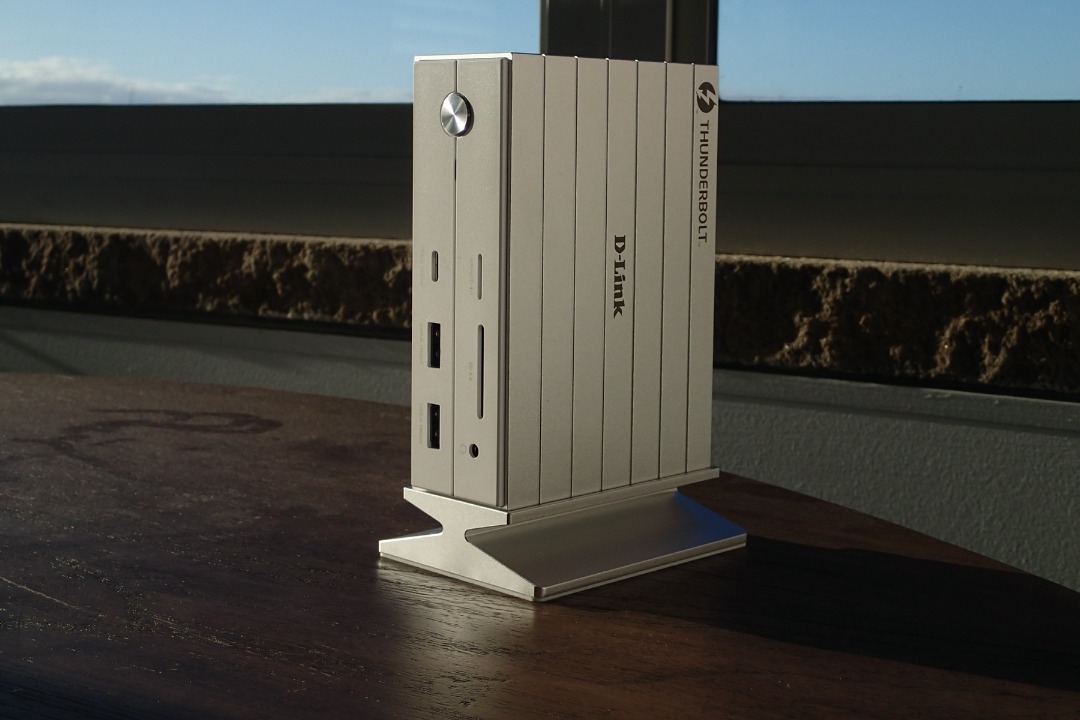
Design & Build Quality
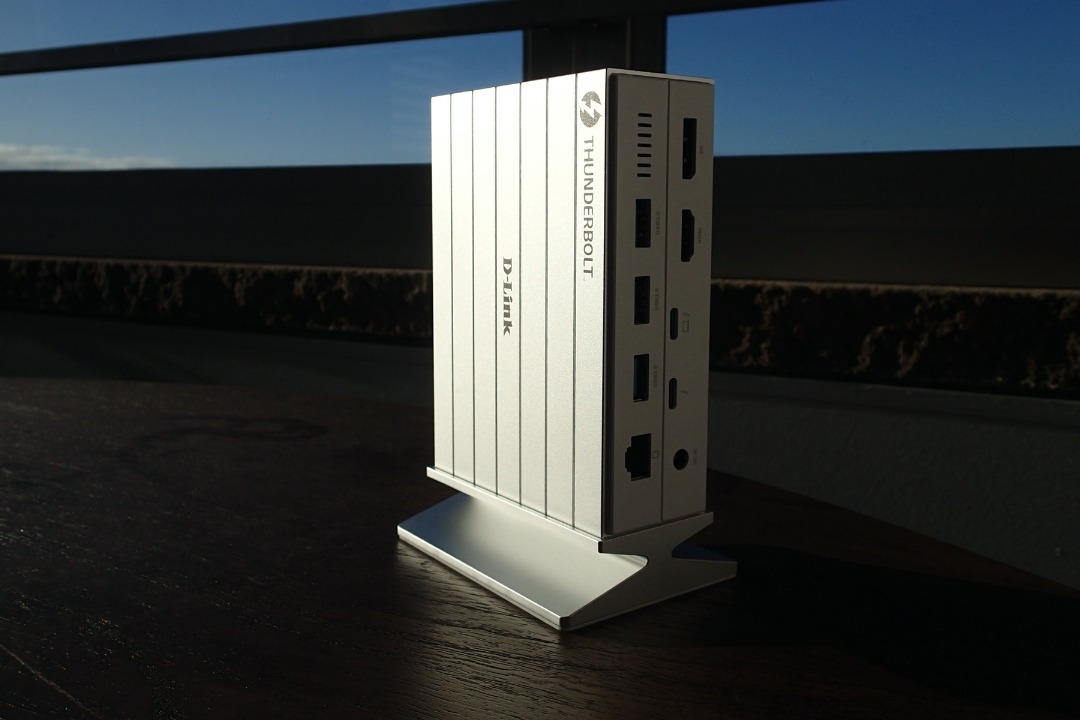
The dock is designed to stand vertically, which is the right call for a 14-port hub. A horizontal brick of this size would dominate the desk and cause endless issues trying to find the right port. Standing vertical, it occupies the footprint of a small hardcover book. The aluminium alloy chassis feels properly solid, not the hollow rattle you sometimes get from cheaper docks dressed up in metal cladding. It’s pleasing to hold and looks right at home on a clean desk.
The magnetic plinth is one of those features that sounds minor until you’ve used it. The base keeps the dock securely upright, and the same magnetic principle prevents cables from working their way loose over time. If you’ve ever had a dock that slowly migrates across your desk as cables tug at it from different directions, you’ll appreciate why this matters.
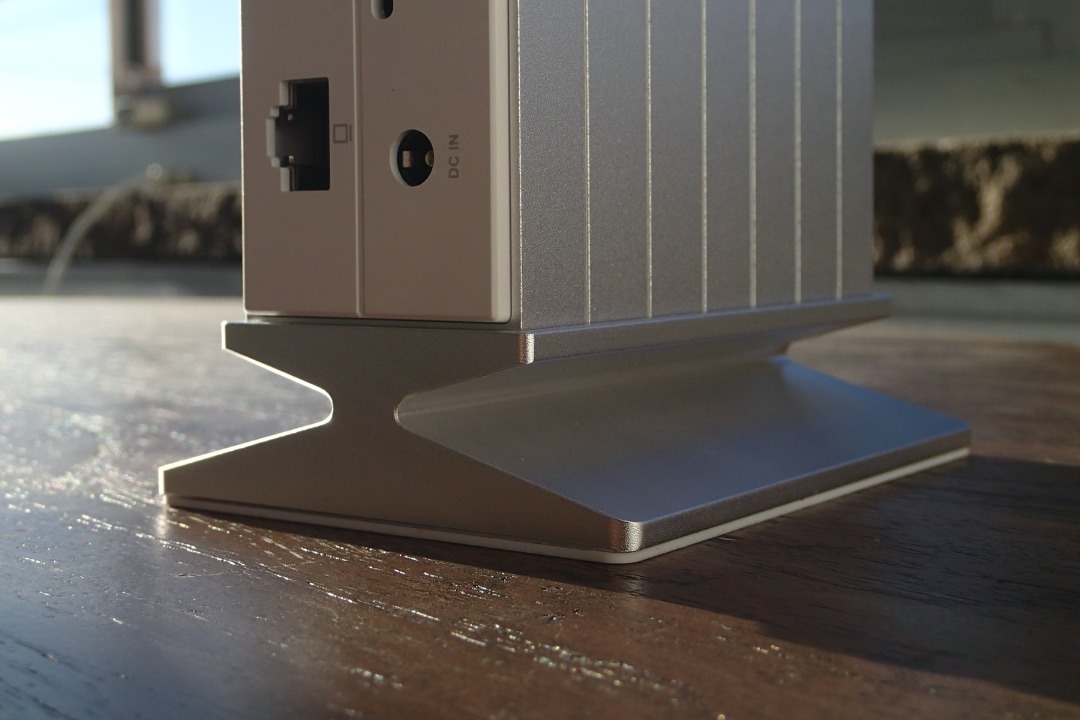
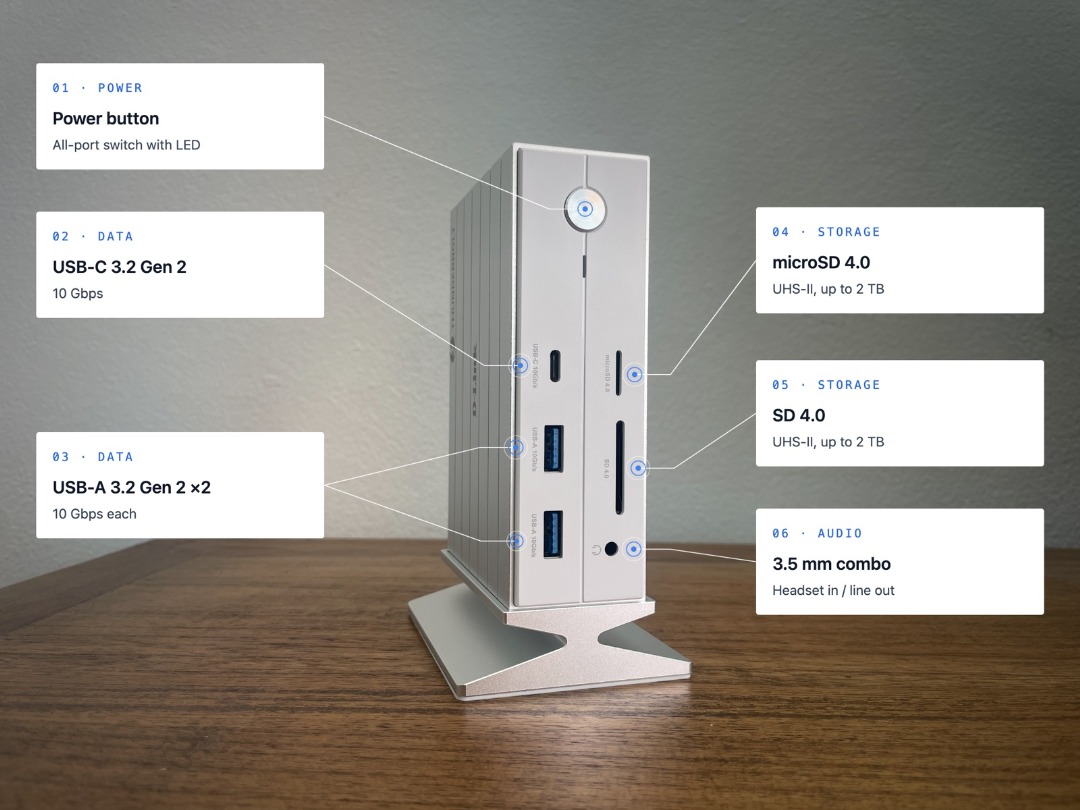
The 14 ports are distributed across the front and rear of the unit. Front-facing ports - like the SD and MicroSD card readers and at least one USB-A - are positioned for things you access regularly. Rear-facing ports handle the semi-permanent connections: displays, Ethernet, and power. Someone has thought about the cable arrangement.
Setup & Out-of-Box Experience
Thunderbolt 4 docks require TB4-certified cables to operate at full capability - D-Link’s TB4 dock is no different, and D-Link notes this clearly. If your laptop has a Thunderbolt 4 port, setup is genuinely straightforward: connect the cable, connect your peripherals, and the dock handles the rest. No driver installation required on current macOS or Windows 11.
One note for Mac users: multi-display support varies depending on your chip. M1/M2/M3 base models support two external displays via HDMI and DisplayPort; the M1 Pro, M3 Pro, and higher support the full triple-display configuration. It’s not a dock limitation - it’s an Apple silicon limitation - but it’s worth checking before you spec up a three-monitor setup around this unit. I'm still rocking a 2015 MacBook Pro for my podcasting and photography, and the docking station works a treat for that!
Day-to-Day Use
In daily use, this dock does what a good dock should do: it disappears. You plug in, everything works, and you stop thinking about it. The 40Gbps Thunderbolt 4 throughput means large file transfers to connected drives are fast - meaningfully faster than USB 3.2 alternatives. The 60W power delivery is sufficient to run and charge most laptops, though if you’re running a power-hungry machine under sustained load, you may want to supplement with the laptop’s own charger.
Front Ports
Rear Ports
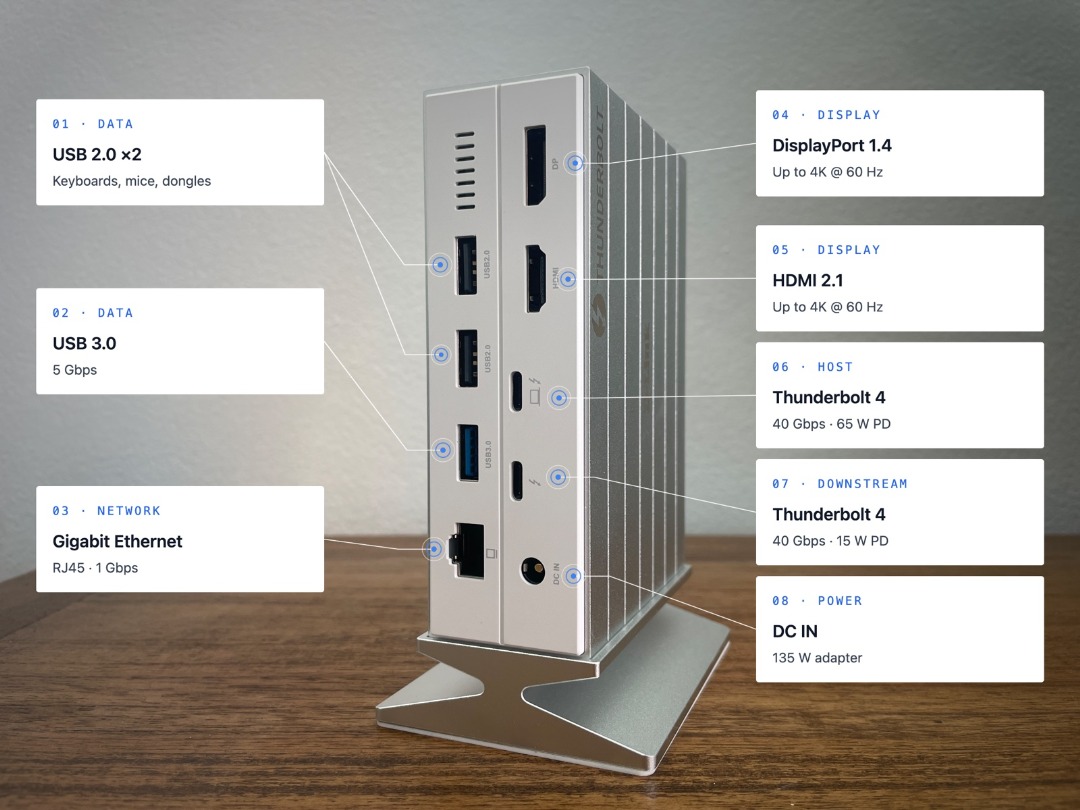
The display support is the headline feature for most buyers. Triple 4K at 60Hz across HDMI 2.1, DisplayPort 1.4, and the Thunderbolt 4 port covers most professional multi-monitor setups comfortably. Single 8K at 30Hz is available for those with an 8K display - a smaller cohort, but good to know the capability is there.
Two ports deserve a specific mention. The SD and MicroSD card readers are built in, which sounds unremarkable until you’ve spent time hunting for a dongle on a deadline. For photographers and videographers who regularly ingest footage, having card readers built directly into the dock - no extra adaptor, no extra cable - is a quiet but genuine workflow enhancement.
The other one for me is the 3.5mm headphone jack. Laptops and smartphones have been eliminating the headphone jack for years, presumably on the theory that everyone has gone wireless. Not everyone has. If you use wired headphones for Zoom calls - and there are good reasons to, including audio latency and call quality - having a proper analogue output on the dock rather than hunting for a USB adaptor is exactly the kind of small thing that matters when you’re already five minutes late to a meeting.
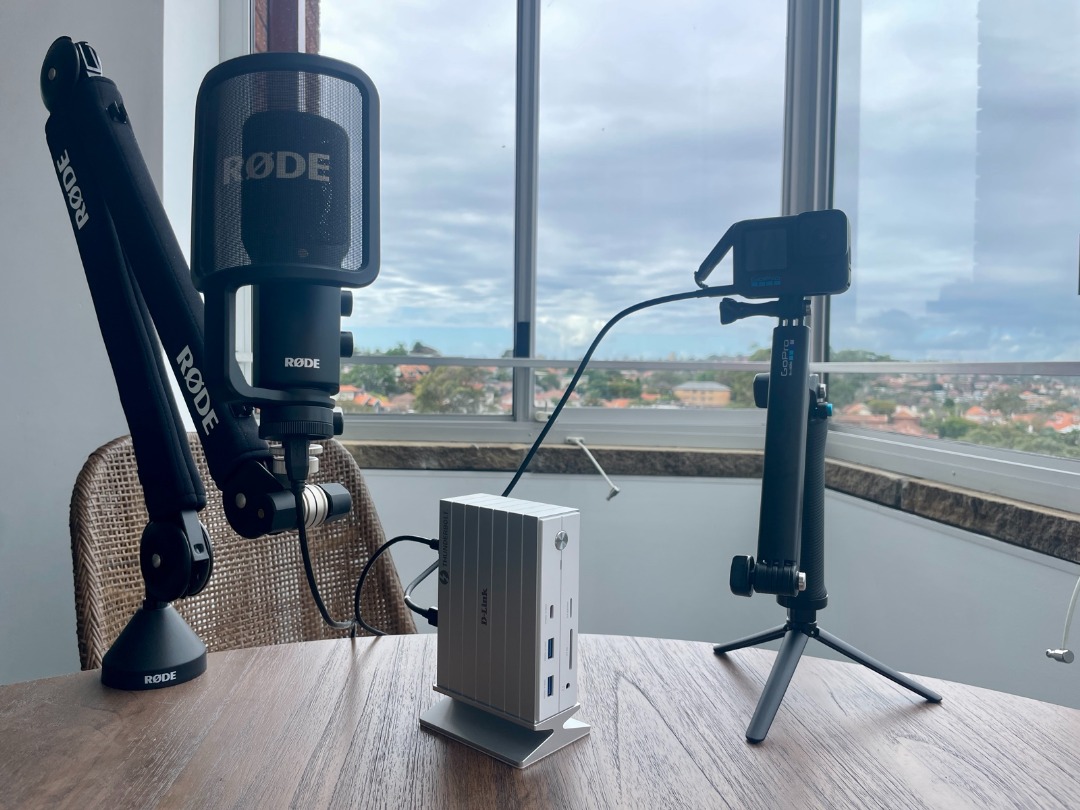
For content creators, the dock makes a working setup drama-free. A RØDE microphone runs cleanly through any USB-A port. A GoPro HERO 12 feeds through without complaint; the 40Gbps TB4 bandwidth has enough headroom that high-quality camera input doesn’t compete with everything else the dock is doing simultaneously.
What Works, What Doesn’t
What works well: The vertical form factor is the right design decision for a dock this port-dense. Build quality is genuinely premium - the aluminium chassis and magnetic base both feel considered rather than cosmetic. The connectivity breadth is excellent: Thunderbolt 4, HDMI 2.1, DisplayPort 1.4, USB-A, USB-C, SD, MicroSD, ethernet, and 3.5mm audio covers almost every practical need. The dual-device charging - 60W to the laptop and 15W to a phone or tablet simultaneously - is very handy.
What doesn’t work well: The 60W power delivery ceiling is worth flagging for users with high-performance laptops. Some machines under load will draw more than 60W, meaning the dock charges slowly or not at all during intensive tasks. Check your laptop’s power requirements before committing.
One genuine omission that will affect exactly nobody under 45: there’s no FireWire port. For those of us old enough to remember when FireWire was the fast interface - before USB decided to catch up - its absence is a generational wound that time has not healed. D-Link, if you’re reading this: IEEE 1394 FTW.
Value & Verdict
At around AU$600, the D-Link 14-in-1 TB4 dock sits at the serious end of the docking station market. It’s not a casual purchase. But it’s priced fairly for what it delivers: genuine Thunderbolt 4 performance, premium build quality, a port selection that doesn’t cut corners, and design decisions - the vertical form factor, the magnetic base, the included card readers - that suggest someone actually thought about how people use these things on a real desk.
If you’re running a multi-monitor setup, regularly ingesting media cards, and using a wired headset for calls, this dock ticks every box. If your needs are simpler - a single display and a couple of USB peripherals - there are cheaper options from the likes of BENQ that will serve you adequately.
Bottom line: Content professionals (and amateurs) running multi-monitor setups, photographers and videographers who need built-in card readers, and anyone who has grown tired of cable chaos and wants a single clean connection point.
Available now. Priced from around AU$600.